The first time I moved streaming devices and phones onto different VLANs, I felt briefly proud and then immediately annoyed.
The network was cleaner.
The trust boundaries were more intentional.
And suddenly the TV stopped appearing where it used to.
AirPlay targets vanished.
Chromecast discovery became inconsistent.
Apps that had felt effortless on one flat LAN started behaving like they had forgotten the house.
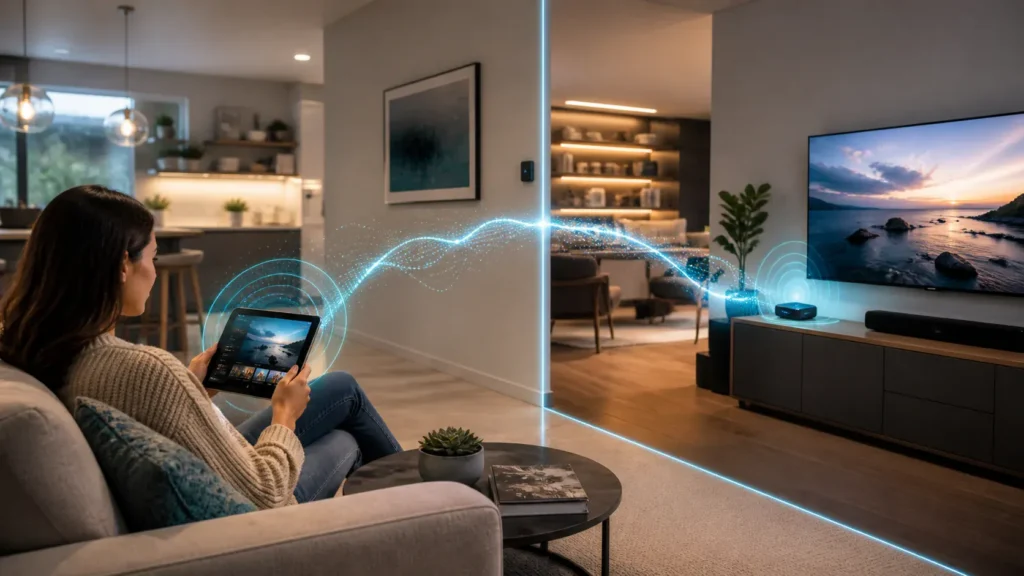
What finally made the problem feel sane was realizing that the network had not become broken in some deep mystical way. It had become routed. And the moment it became routed, discovery traffic that used to drift around the same segment stopped crossing the boundary automatically.
That is where mDNS reflectors and Avahi enter the story.
- Why AirPlay and Chromecast break so easily across VLANs
- What mDNS is actually doing
- What Avahi reflection fixes and what it does not
- Why Apple and Google both assume a flatter local network by default
- How to think about firewall policy after discovery starts working again
- When mDNS reflection is worth it and when it becomes too generous
- How I think about this design now
The protocol and configuration baseline below is checked against the IETF specification; the topology and risk recommendations are my practical interpretation.
The first broken thing is usually discovery, not streaming itself
This was the mental shift that helped me most.
When people say “AirPlay stopped working across VLANs” or “Chromecast broke after segmentation,” the first instinct is often to think about media traffic, bandwidth, or firewall rules in the biggest possible sense.
But the first thing that usually breaks is simpler:
the devices stop finding each other.
Apple’s current deployment guidance says Bonjour is designed to help devices and services discover each other on the same network, and specifically notes that AirPlay-compatible devices are commonly discovered that way. Google Cast’s official discovery troubleshooting page is even more blunt: before troubleshooting, the sender device and the Cast-enabled device must be connected to the same Wi-Fi network, and the discovery process looks for the _googlecast._tcp.local service record.
That is the hidden assumption one flat home LAN gives you for free:
- the sender is nearby in the same local broadcast or multicast neighborhood;
- the receiver advertises itself there;
- the app sees it and behaves as if networking were easy.
Once the neighborhood is split, the assumption stops holding.
mDNS is local by design, which is exactly why VLANs frustrate it
RFC 6762 makes this wonderfully clear once you read it with home networking in mind.
Multicast DNS uses the link-local multicast address 224.0.0.251:5353 for IPv4, with the IPv6 equivalent FF02::FB:5353. That phrase “link-local” is the important emotional clue. mDNS was built to live on the local link, not to roam naturally across routed subnet boundaries.
Apple says the same thing in practical deployment language: Bonjour uses multicast traffic to advertise services, and because multicast traffic is usually not routed across subnets, Apple TV devices and other Bonjour-discovered devices typically need to be on the same IP subnet for the normal small-network experience.
That is why this problem is so common.
VLANs are doing exactly what you asked:
- they created real boundaries;
- the boundaries created real subnets;
- and mDNS, being local by nature, stopped drifting across them casually.
In other words, discovery did not fail because VLANs were misbehaving.
Discovery failed because VLANs were finally behaving honestly.
Avahi helps by reflecting discovery, not by erasing the boundary
This is the most important sentence in the whole topic.
Avahi is not “the VLAN fix.”
It is a very specific mDNS/DNS-SD helper.
The Avahi project describes itself as a system that facilitates service discovery on a local network via mDNS and DNS-SD. Netgate’s pfSense documentation says the same thing in product terms: the Avahi package facilitates local service discovery and is the same general family of technology used by Apple’s Bonjour.
The real magic, though, is in Avahi’s reflector behavior.
Its configuration documentation says that when enable-reflector=yes, avahi-daemon reflects incoming mDNS requests to all local network interfaces, effectively allowing clients to browse mDNS and DNS-SD services on all networks connected to the gateway. The same documentation also warns that some functionality is lost, especially the unicast reply bit, and that you should not run multiple reflectors between the same networks because they can bounce packets back and forth.
That is a very honest description.
Avahi can make devices visible across VLAN boundaries again.
It does not mean the boundaries vanished.
Reflection fixes the “I can’t see it” problem, but not automatically the “I can use it” problem
This is where people often over-celebrate the first success.
A phone suddenly sees the Apple TV again.
The Cast button returns.
The receiver name appears.
It feels like the entire problem has been solved.
Sometimes it has.
Often it has only reached phase two.
Discovery and actual service traffic are related, but they are not identical.
Apple’s AirPlay deployment guide says that Apple devices use Bonjour to discover AirPlay-compatible devices, but it also notes that if Bluetooth-based discovery is used, there still must be no firewall restrictions from the source device to the Apple TV for the method to work. Google’s Cast troubleshooting guidance similarly tells you to check actual network reachability, multicast visibility, router settings, and to disable AP isolation.
That is the deeper lesson:
- mDNS reflection can restore visibility;
- firewall policy still decides reachability;
- AP isolation or client isolation can still interfere;
- and the stream or control session still needs a path that makes sense.
So yes, the receiver can reappear after Avahi.
But if the VLAN policy still blocks what happens next, discovery alone will only make the failure more polite.
AirPlay and Chromecast behave similarly here, but not identically
They belong in the same family of problems, but they are not clones.
Apple’s guidance introduces a nuance many people do not expect: AirPlay discovery can also involve Bluetooth Low Energy advertisement and peer-to-peer discovery, not only Bonjour. In some Apple TV scenarios, devices do not need to be on the same network at all if peer-to-peer methods are available and close enough. Apple also says networks using a Bonjour gateway or similar technology for AirPlay should advertise both _airplay._tcp and _raop._tcp services.
Google Cast’s guidance is less forgiving in its plain troubleshooting language. It expects sender and receiver to be on the same Wi-Fi network and explicitly tells you to inspect the _googlecast._tcp.local record when debugging discovery.
That difference matters because it explains why AirPlay can sometimes feel mysteriously more resilient or weirder than Chromecast in segmented homes. Some Apple experiences have extra discovery paths. Chromecast usually makes the same-network assumption much more directly.
The general principle still holds for both:
if discovery relies on mDNS and your routed design blocks that local multicast behavior, you will probably need a helper.
Avahi should be treated like a scalpel, not like a flatten-the-network button
One of the smartest details in Avahi’s reflector documentation is reflect-filters.
The official configuration file says you can define a comma-separated list of allowed service names to be reflected, and that each service seen must match that list to be reflected to other networks. By default, everything is allowed.
That default is convenient.
It is not always wise.
This is where the lesson from the Home Assistant IoT VLAN article comes back very strongly for me. Discovery exceptions should stay as narrow and explainable as possible. If reflection becomes “just allow all the Bonjour things everywhere,” the network may keep its VLAN numbers while quietly losing the meaning of its boundaries.
I now prefer asking:
- which devices actually need to be discovered across segments?
- which service names matter?
- which interfaces should participate at all?
- is the problem better solved by co-locating especially discovery-sensitive devices instead?
Those questions keep reflection from turning into accidental re-flatness.
Wireless isolation and AP isolation can quietly sabotage the whole plan
This topic also touches another lesson that feels separate until it suddenly is not.
Google’s Cast troubleshooting page explicitly says to turn off AP isolation on the router when diagnosing discovery problems. That matters because AP isolation can block client-to-client visibility even before VLAN routing enters the story.
Apple’s guidance similarly warns that discovery and connection behavior can depend on local conditions, firewall restrictions, and device proximity for Bluetooth-assisted methods.
This is why I no longer treat “same SSID” as enough evidence that two devices should see each other properly. If the network uses guest-style isolation, wireless client isolation, or very restrictive AP-side behavior, mDNS reflection at the gateway may not rescue a design whose wireless edge is already refusing the conversation.
That is also why this article fits naturally beside home IoT VLAN isolation. Sometimes the missing discovery path is not only a routed-boundary issue. Sometimes the WLAN itself has already decided that local peer visibility should be reduced.
If AirPlay or Chromecast targets reappear after enabling reflection but still fail to connect, the discovery problem may be solved while the actual control or media path is still being blocked elsewhere.
Sometimes the right answer is not more reflection, but a simpler topology
I like Avahi more when it stays boring.
If I only need one trusted phone VLAN to discover one media VLAN, and a few selected services need to show up, Avahi can be a beautiful, minimal bridge. If I find myself reflecting broad classes of service across multiple internal zones because too many things are unhappy after segmentation, that is usually a sign the network design may be ahead of my operational clarity.
Sometimes the cleaner answer is:
- keep the streamer on the same trusted interior as the sender devices;
- put low-trust devices elsewhere;
- reduce the number of cross-segment discovery expectations;
- or use one simpler media zone instead of several elegant mistakes.
That is not architectural failure.
That is architectural honesty.
It also fits the mindset behind learning VLANs as trust boundaries instead of as trophies.
How I think about Avahi and mDNS now
I no longer think of Avahi as a miracle fix.
I think of it as a discovery translator for a network that has become more honest than consumer protocols expected.
That is a much calmer way to use it.
mDNS is local by design.
AirPlay and Chromecast often depend on that locality.
VLANs interrupt it for good reasons.
Avahi can selectively restore just enough discovery to make the house feel normal again.
But only if I remember what it is and what it is not.
It is a discovery exception.
It is not permission.
It is not a universal media gateway.
And it is definitely not an excuse to stop thinking about policy.
Conclusion
AirPlay and Chromecast often break across VLANs because their easiest discovery path depends on local multicast behavior that routed boundaries do not normally carry. Avahi helps by reflecting mDNS between selected interfaces, which can make those receivers visible again without flattening the whole network outright. That makes it useful, but only when it is treated carefully.
What finally helped me was stopping the story at the right place. Avahi solves visibility. It does not automatically solve trust, reachability, or wireless isolation. Once I understood that, the whole topic stopped feeling mystical. It became one more case where a clean network needs a small, intentional exception to preserve normal life.