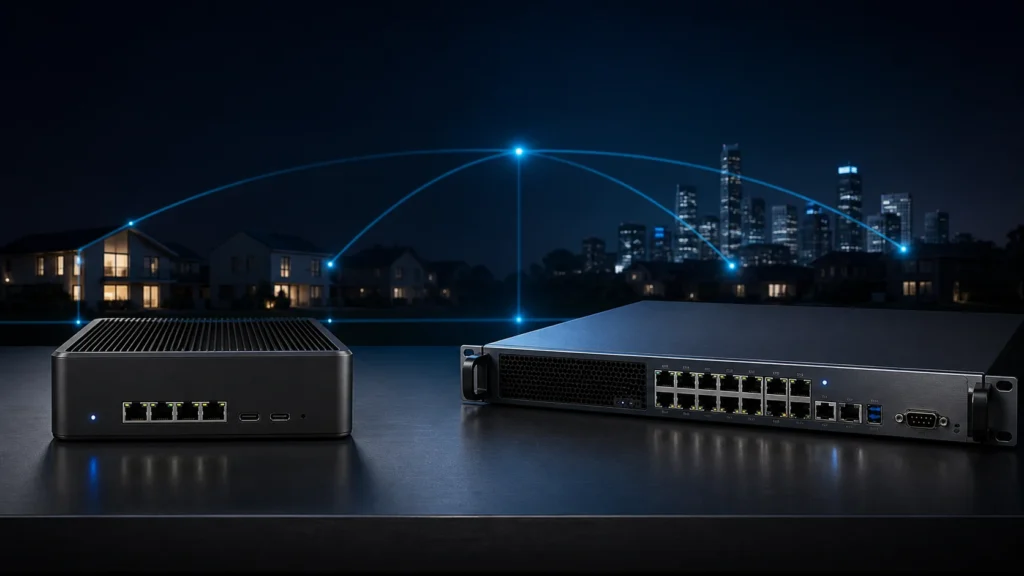
For a long time, enterprise hardware felt morally superior to me. If I was building a real router, surely it should look like one. It should have more ports than I currently needed, a heavier chassis than my other lab devices, and ideally some faint aura of being pulled from a rack in a place with fluorescent lighting and actual change control. A mini-PC, by contrast, felt suspiciously modest. Useful, yes. Serious, maybe not.
That instinct turned out to be emotionally understandable and technically incomplete. The better DIY router is not the one that looks most like a datacenter artifact. It is the one that can route, filter, survive reboots, stay understandable, and remain pleasant enough to live with that you do not resent it six months later. In a home or homelab, that often changes the answer. Sometimes a mini-PC really is the smarter platform. Sometimes enterprise hardware still wins. The trick is knowing what problem each style of machine is actually solving.
- Why enterprise hardware feels like the obvious serious choice
- What router platforms really need beyond marketing confidence
- Where mini-PCs shine in a home network
- What enterprise hardware still does better
- Why NIC quality matters more than the chassis story
- How noise, power, and thermals quietly change the decision
- When I would choose each path today
- What a sane beginner decision looks like
The protocol and configuration baseline below is checked against Netgate's official documentation; the topology and risk recommendations are my practical interpretation.
The first trap is confusing "more professional" with "more appropriate"
Enterprise gear carries a certain narrative weight. It implies uptime, seriousness, and a world where hardware is expected to earn its place. That is not imaginary. Enterprise systems often are built for harder duty cycles, more predictable remote access habits, and more structured deployment environments.
But the home network is not a small datacenter simply because we admire datacenters. It has different constraints. It sits near people. It shares electrical cost with normal life. It often lives in an office, closet, or shelf where noise and idle power are not abstract concerns. It may need to be fixed at midnight by one tired person instead of by a team with spare parts and a console cart.
That was the change in perspective that helped me. I stopped asking which option looked more legitimate and started asking which one would still feel legitimate after months of ordinary ownership.
A router platform is mostly a stability machine, not a prestige machine
Official pfSense and OPNsense documentation both make the core point plainly: the platform needs compatible network interfaces, enough CPU and RAM for the intended workload, reasonable storage, and an installation method that suits the hardware. Netgate’s current pfSense minimum requirements are modest on paper: 64-bit x86-64 hardware, at least 1 GB of RAM, an 8 GB or larger disk, and one or more compatible NICs. OPNsense goes a bit further by publishing more practical tiers and by emphasizing that CPU, RAM, storage, and especially the number and quality of network interfaces shape the result.
That last phrase matters. Number and quality of network interfaces.
When I first thought about router hardware, I thought mostly about the box. The docs pushed me back toward the interfaces. If the machine has unstable NICs, odd driver behavior, awkward offloading quirks, or limited compatibility with the operating system underneath your firewall platform, the rest of the chassis will not rescue the experience.
In other words, a DIY router is not judged by how authoritative it looks on a shelf. It is judged by what happens when traffic flows through it all day and something annoying needs to be debugged.
Mini-PCs are appealing because they fit real homes unusually well
A good mini-PC router has several virtues that become more obvious the longer you live with one.
The first is physical calm. Mini-PCs are often quiet, compact, and low-power compared with older enterprise gear. That matters more than enthusiasts sometimes admit. A router is not a once-a-month toy. It is part of the room, part of the power bill, part of the thermal story, and part of the emotional baseline of the network. If it is silently doing its job, you forget it in the best possible way.
The second is efficiency. For a home network with sane throughput needs and a reasonable ruleset, you often do not need a chassis designed for a much harsher operational life. OPNsense’s current hardware guidance makes this visible: the "reasonable" and "recommended" specs are still fundamentally small-system numbers, not a demand for oversized infrastructure. The platform cares about the actual workload, not your ambition to feel overprepared.
The third is flexibility. Modern multi-NIC mini-PCs can be excellent little firewall hosts when the NICs are good and the cooling is competent. They fit naturally into a local network where the firewall only needs a handful of interfaces, predictable VPN performance, some VLANs, and maybe room for IDS or IPS later if the CPU budget allows it.
This is the point where mini-PCs stopped feeling like a compromise to me. They started feeling like hardware that was honest about the scale of the problem.
Enterprise hardware still wins when the operating surface matters more than elegance
There are still real reasons to prefer enterprise-style gear.
One is console culture. Netgate’s documentation spends real time on serial console access because, on hardware that supports it, console access is part of how you recover cleanly when the network path is not available. That matters more on dedicated network appliances than it does on a general-purpose little desktop box. A platform that assumes console-based troubleshooting, known serial behavior, and appliance-like recovery patterns can be deeply reassuring when the firewall is the thing standing between you and the rest of the network.
Another is interface density and operational predictability. Enterprise-oriented boxes often provide more ports, more predictable port labeling, more appliance-like boot behavior, and a shape that makes sense in racks or structured enclosures. If the network genuinely needs multiple WANs, more segmented interfaces, fiber options, or stronger assumptions around physical layout, enterprise hardware begins to justify itself more clearly.
Then there is durability of intent. A machine that was designed from birth to be a network appliance often communicates its purpose better than a repurposed mini-PC. That does not automatically make it better, but it can make the environment easier to explain, document, and support.
Where I changed my mind was in recognizing that these strengths are not free. They often arrive bundled with more noise, more age, higher idle power, less pleasant acoustics, or a level of physical seriousness that home life may not actually reward.
NIC quality matters more than almost every beginner shopping instinct
If there is one lesson I would push hard in this category, it is this: stop obsessing over the word "enterprise" before you have looked carefully at the NICs.
OPNsense’s hardware documentation explicitly notes that Intel NICs are reliable, fast, and less error-prone, with lower CPU load. Its interface settings documentation also reminds you that some hardware offloading and VLAN-related features can be broken or incompatible on some network cards and drivers. That is a more useful clue than many buying guides offer.
A silent mini-PC with solid Intel NICs can be a much better router than a more dramatic piece of hardware with awkward interfaces, questionable driver behavior, or networking silicon that only looks attractive in a listing screenshot.
This also changes how I think about the software stack. A DIY router is not just forwarding packets. It may eventually carry VLANs, VPNs, IDS or IPS, traffic shaping, DNS services, or more advanced policy. Netgate’s sizing guidance points out that features such as Snort or Suricata can significantly change RAM and CPU needs, and that VPN throughput can make cryptographic acceleration important. Those demands land first on the platform’s real capabilities, not on its aesthetic category.
Good NICs, stable driver behavior, and enough CPU for your actual feature set matter more than whether the box looks like enterprise gear from a distance.
Noise and power are not "consumer concerns"; they are operational concerns
This was one of the easiest truths for me to underestimate because it feels less technical than throughput charts.
But power draw is a form of permanence. Noise is a form of permanence. Heat is a form of permanence.
An older enterprise appliance may be perfectly usable as a firewall and still be the wrong answer if it turns your workspace into a mild mechanical argument. A used rack unit that seems cheap on day one may be expensive in the slower currency of annoyance. It may also encourage bad physical placement, like hiding it somewhere with worse airflow or more awkward cable access just to keep the sound away from people.
Mini-PCs are not immune to thermal compromise, of course. Some are badly cooled, some rely too much on tiny fans, and some look better in photos than they do under continuous routing and VPN load. But when a mini-PC is well chosen, its quietness is not cosmetic. It is part of what makes the router feel like infrastructure instead of a tolerated experiment.
The right answer also depends on how much you want to tinker with the hardware itself
There is a difference between wanting to run your own router software and wanting to manage a hardware relationship.
Mini-PCs often suit the first desire. You install the software, define the interfaces, set up DHCP, reservations, VLANs, and rules, and the machine mostly disappears into the background. If your larger goal is to learn routing policy, address management, and trust boundaries, this can be ideal. It keeps attention on the network rather than on the chassis mythology.
Enterprise hardware often suits the second desire more naturally. You may care about serial console behavior, rack layout, more explicit appliance ergonomics, multiple dedicated interfaces, or simply the pleasure of using a purpose-shaped object. That can be a legitimate part of the hobby. It just should not be mistaken for universal necessity.
This is similar to what happens when planning addressing. In the guide to static IPs, DHCP reservations, and leases, the best answer was rarely "freeze everything manually." The calmer answer was usually to centralize policy where possible. Router hardware choices feel similar to me now. The calmer answer is usually the one that leaves fewer hidden obligations behind.
When I would choose a mini-PC today
I would choose a mini-PC when:
- the network is home-scale or serious-homelab-scale, not pretending to be a branch office for emotional reasons;
- I want low noise and low idle power;
- I only need a modest number of interfaces;
- the hardware has NICs I trust;
- I want the firewall to be easy to place, easy to forget, and easy to live with;
- my real interest is the network policy, not the theater of the hardware.
That last point is more important than it sounds. A small, reliable router can be the adult answer even when it feels less romantic.
When I would still choose enterprise-style hardware
I would choose enterprise hardware when:
- console access and appliance-style recovery matter a lot;
- I genuinely need more interfaces, more structured port layout, or more platform-specific features;
- the environment can tolerate the physical downsides;
- the hardware is still efficient enough that I am not paying a nostalgia tax forever;
- I want the router to behave like a dedicated network appliance first and a compact computer second.
I would also choose it when the project itself is part of the point. Sometimes the machine is not just carrying traffic. Sometimes it is teaching you how dedicated network gear thinks, boots, fails, and gets recovered. That is a perfectly good reason, as long as it is named honestly.
A firewall sized for imagined future complexity can become louder, hotter, and more annoying than the network ever needed. Size for the features you plan to use, with some headroom, not for an imaginary small enterprise that may never appear.
Hardware selection is easier once the addressing model is clear. The explanation of public and private IP ranges provides the foundation for deciding which interfaces and network roles the router must actually support.
The same boundary becomes clearer alongside Bridge Mode vs. AP Mode: How I Use Old Routers as Access Points and Dynamic DNS (DDNS): Accessing Your Home Network When Your ISP Changes Your IP, because these choices affect where traffic, policy, and trust meet.
Conclusion
Building a DIY router is one of those projects where the emotionally impressive answer and the operationally wise answer do not always match. Enterprise hardware still offers real advantages: console habits, interface density, appliance behavior, and a kind of physical seriousness that can be useful when the network is genuinely demanding. But mini-PCs deserve much more respect than I once gave them. In many homes and homelabs, they are quieter, cheaper to live with, easier to place, and entirely capable when paired with the right NICs and a realistic feature set.
The best DIY router is not the one that most resembles enterprise mythology. It is the one that carries your traffic calmly, survives your mistakes, fits your room, and keeps your attention on the network instead of on the machine’s self-image.
FAQ
Are mini-PCs good enough for a DIY router?
Often yes. For many home and homelab environments, a well-chosen mini-PC with good NICs, sufficient cooling, and enough CPU for the intended firewall, VPN, and inspection features is an excellent router platform.
Why do people still choose enterprise hardware for DIY routers?
Because enterprise-style gear can offer stronger console access patterns, more interface density, more appliance-like behavior, and operational habits that feel predictable when the firewall is a core infrastructure role.
What matters more: CPU speed or NIC quality?
Both matter, but beginners often underestimate NIC quality. Driver stability, compatibility, and reliable interface behavior can matter as much as raw CPU capability, especially when VLANs, offloading quirks, VPNs, or inspection features enter the picture.
Is older enterprise hardware always a better value than a mini-PC?
Not necessarily. Older gear can be physically robust and cheap to acquire, but it may also cost more in noise, heat, power draw, or simple day-to-day annoyance than a quieter modern mini-PC.
When does router hardware need more RAM and CPU than expected?
Usually when the feature set grows. IDS or IPS packages, high VPN throughput, many concurrent states, and more advanced services can push hardware requirements far beyond what a basic routing and firewall setup needs.
Which choice is better for a beginner?
Usually the one that keeps the network understandable. For many beginners, that means a quiet, compact, compatible mini-PC with trustworthy NICs rather than a louder piece of enterprise gear bought mainly because it felt more serious.