For a long time, a smart TV did not feel like a serious network device to me.
It felt like a screen.
Big, passive, boring, domestic.
Something you watched, not something that participated.
And I think that emotional mistake is exactly why smart TVs get too much trust in too many homes.
A modern smart TV is not just a display panel with an HDMI port anymore. It is an internet-connected device with apps, software updates, background services, vendor telemetry, account logins, and in some cases microphones, cameras, or voice integrations nearby in the same ecosystem. Once I started looking at it that way, it became much harder to justify placing it on the same trusted network as my personal computers, work devices, admin surfaces, and internal services.
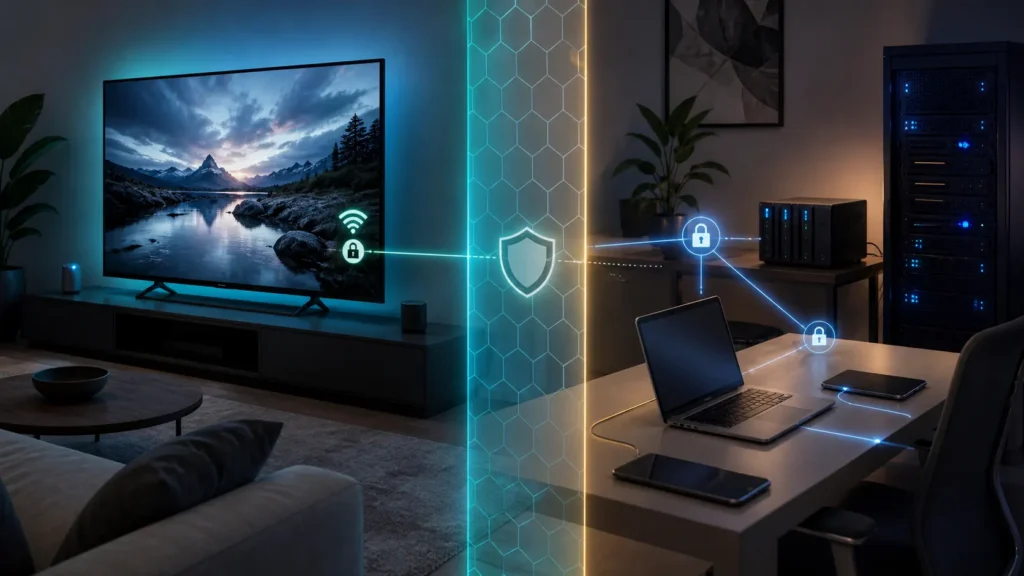
That is why I do not think a smart TV belongs on the main trusted network in most homes.
Not because it is evil.
Not because every television is one patch away from catastrophe.
But because it usually lives on the wrong side of the trust line.
- Why a smart TV is closer to an IoT device than a trusted workstation
- What official guidance says about guest and lower-trust devices
- Why privacy and telemetry concerns matter even without a dramatic hack story
- How pfSense makes this separation practical at home
- What I would still allow a TV to reach, and what I would keep away from it
The biggest mistake is treating a smart TV like a normal trusted endpoint
The screen is what confuses people.
A laptop looks like a computer, so we instinctively treat it like a device that deserves updates, passwords, account care, and cautious placement in the network.
A smart TV looks like furniture.
But the trust question should not be driven by the shape of the device.
It should be driven by behavior.
And the behavior of a smart TV is much closer to lower-trust consumer IoT than to a workstation you actively manage. It runs vendor software, downloads content and updates, accumulates apps, talks to external services, and often stays in service for years after the household stops thinking about its software life at all.
That is not a reason to panic.
It is a reason to categorize it honestly.
Official guidance already points in this direction
This is not just a homelab aesthetic preference.
CISA’s Project Upskill guidance on securing home Wi-Fi explicitly says guest Wi-Fi should be used by anyone who does not routinely connect to the home network and adds that smart-home and other IoT devices should also connect to guest Wi-Fi. I think that is one of the clearest official endorsements of the principle most people actually need:
not everything in the house deserves the same network trust.
That idea matters because it shifts the question from “Is the TV dangerous?” to something much healthier:
- “Does this device deserve full lateral trust inside the house?”
For me, the answer is usually no.
If the television mainly needs internet access, streaming services, and perhaps access to a narrowly defined media source, then giving it broad reach into private laptops, admin systems, file shares, or management interfaces feels unnecessarily generous.
Privacy is part of the trust decision, not just security
The FTC’s consumer guidance on securing internet-connected devices at home calls out smart TVs directly. It tells users to find the TV’s tracking settings, adjust them to their privacy preferences, and remove apps they do not use because those apps can still collect data.
That point matters more than it first appears to.
Even if a smart TV never becomes part of some dramatic intrusion story, it can still be a device that:
- collects more usage data than you would like;
- runs software you did not choose carefully;
- keeps unnecessary apps installed for years;
- exists in a vendor ecosystem you do not control deeply.
That is not the profile of a device I want sitting beside:
- my primary laptop;
- my password vault access points;
- my admin browser sessions;
- my homelab dashboards;
- my personal file shares.
Again, this is not paranoia.
It is classification.
A smart TV is usually an entertainment endpoint with cloud-heavy vendor behavior, not a trusted core device.
pfSense makes the separation practical instead of theoretical
One reason I like talking about this in a pfSense context is that pfSense makes the boundary easy to express once you decide it matters.
Netgate’s documentation on additional LAN-style interfaces is explicit that those interfaces can be used for things like guest networks and IoT isolation. Their firewall rule methodology also reminds us that rules are applied per interface in the inbound direction on that interface, which is exactly the kind of model that makes lower-trust segmentation useful.
That means you can create:
- a separate guest or IoT-style interface for the TV network;
- a dedicated VLAN if that suits the rest of the house;
- rules that allow the TV what it actually needs instead of what it might one day attempt.
This is where segmentation stops being abstract and becomes helpful.
If the TV lives on its own lower-trust segment, I can allow:
- internet access;
- DNS;
- maybe access to a specific local media server if I really need it;
- maybe casting or discovery exceptions if I have chosen them deliberately.
And I can avoid casually allowing:
- access to management interfaces;
- access to private laptops;
- access to admin dashboards;
- access to internal shares the TV never needed in the first place.
That design pairs naturally with the broader logic behind guest networks and meaningful VLAN segmentation at home.
The point is not isolation for the sake of aesthetics
I think this is where some people get turned off by the whole idea.
They imagine a giant complicated network policy just to watch Netflix.
But that is not what I am advocating.
I am advocating one very boring and very practical principle:
- devices with lower trust and narrower purpose should usually get narrower reach.
That is it.
A smart TV does not need to be treated like an enemy.
It just does not need to be treated like a peer of your most trusted devices either.
If the house is simple, this may mean putting the TV on guest Wi-Fi.
If the house is more deliberate, it may mean an IoT VLAN with a few carefully chosen exceptions.
If wireless segmentation is involved, ideas like wireless isolation may also become relevant depending on how the access point handles client behavior.
The right implementation can vary.
The trust model usually should not.
What I would actually allow a smart TV to reach
This is where the design becomes sane instead of ideological.
A smart TV usually needs:
- internet access;
- DNS;
- access to streaming services;
- time synchronization;
- perhaps one or two deliberate local services like a media server.
It usually does not need:
- broad reach to personal computers;
- visibility into management networks;
- access to hypervisor interfaces;
- open access to shares and admin tools;
- casual reach to anything simply because it happened to be on the same LAN before.
That does mean some conveniences may need deliberate exceptions.
Casting, discovery, and local streaming workflows can complicate the picture.
But I would much rather make a few intentional exceptions than leave the whole relationship flat just because convenience is easier than classification.
Verification note: Commands, terminology, and support details in this guide were cross-checked against NIST’s home IoT security guidance.
For broader context, continue with What I Wish I Knew Before My First VLAN and Home Assistant on an IoT VLAN: Safe Network Rules Without Breaking Discovery.
Conclusion
I do not think smart TVs belong on the main trusted home network because they are usually low-attention, vendor-managed, app-heavy consumer devices that do not deserve the same lateral trust as personal computers, work systems, or administrative infrastructure. Official guidance points in the same direction: CISA recommends guest Wi-Fi for smart-home and IoT devices, while FTC guidance reminds users that smart TVs have tracking settings and unused apps that can still collect data and deserve active scrutiny.
Once that is combined with pfSense’s ability to create additional local interfaces and enforce per-interface rules, the cleaner design becomes obvious. Put the television on a lower-trust segment, allow what it truly needs, and keep the rest of the house more private by default. That is not anti-TV. It is simply a more honest way to draw the trust boundary.
FAQ
Is a guest or IoT network really necessary just for one smart TV?
Not always necessary in an absolute sense, but usually worthwhile if your network supports it. The TV often does not need broad local access, so even one device can justify a lower-trust segment if the main network contains personal computers, work devices, file shares, or admin systems you care about protecting.
Won’t putting a smart TV on another network break casting or local streaming?
It can if you separate things too bluntly, but that does not mean the TV belongs on the trusted LAN by default. It usually means you should add a few deliberate exceptions for the specific services you actually use instead of leaving unrestricted local reach as the permanent default.