Some devices do not merely sit on a desk. They make an argument.
A trackball was one of those devices.
Put one beside an ordinary office keyboard and it already looked slightly overqualified for the room. It looked deliberate. It looked technical. It looked like the sort of tool a person used not because it was the default, but because the default had already been tried, judged, and found slightly too clumsy for serious work.
That is why trackballs developed such a particular reputation around CAD and engineering culture. Not because every designer on earth used one, and not because a trackball magically solved every precision problem, but because it matched the psychology and the physical reality of workstation life unusually well. In rooms where long sessions, careful cursor placement, crowded desks, and repetitive movement all mattered, the strange stationary ball had a way of looking less weird the longer you stared at it.
It began to make sense.
- Why trackballs always looked more serious than ordinary mice
- How stationary control suited long CAD sessions
- Why precision work often values micro-movement over sweeping movement
- How trackballs fit the physical culture of engineering desks
- Why the reputation lasted even after mice became much better
- What the trackball still represents now
The historical details below are checked against the Computer History Museum archive; the interpretation and first-person perspective remain the author’s own.
A trackball looked like a professional decision before anyone explained it
Part of the device’s power was visual.
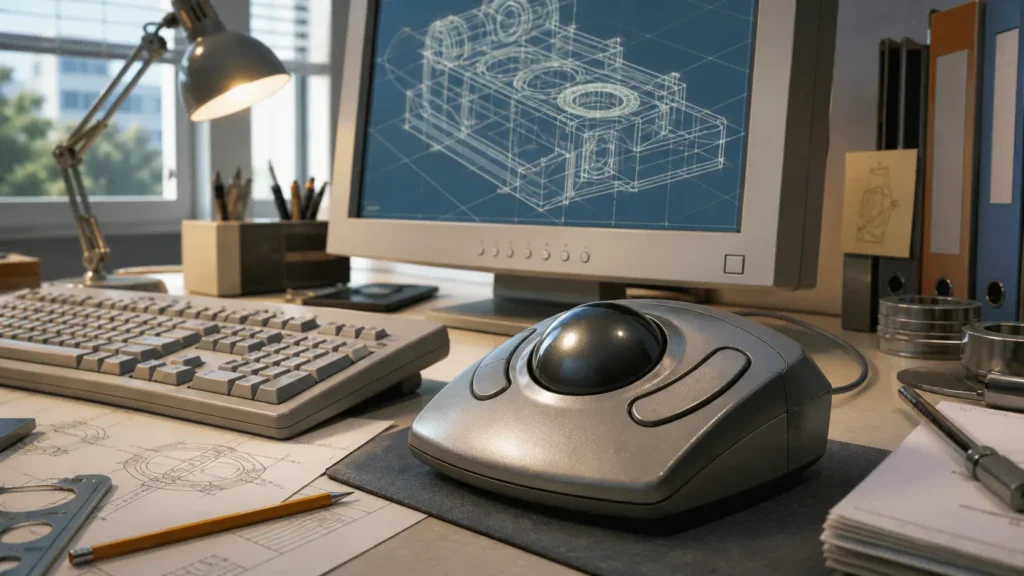
An ordinary mouse always looked a little domestic, a little general-purpose, a little temporary. A trackball looked installed. It resembled lab equipment or something borrowed from a more expensive machine. The exposed ball, the larger body, the heavier base, and the sense that it would not casually slide around the desk all contributed to its aura.
That aura mattered in technical environments.
CAD work has always had a cultural side, not only a functional one. Workstations were places where the user wanted the tools to signal seriousness: bigger displays, specialized keyboards, reference papers, notebooks full of dimensions, and input devices that suggested control rather than convenience. A trackball fit into that world almost too perfectly. It looked like a device chosen by someone who spent all day moving through drawings, parts, surfaces, and views where careless movement had a cost.
Even its history contributes to that feeling. The Computer History Museum traces the origins of the trackball back to the DATAR system in the early 1950s, where the device was used to control radar plotters. That military and technical ancestry gave the trackball a very different emotional lineage from the office mouse. The mouse grew into mainstream computing. The trackball always retained a hint of instrumentation.
Stationary control made sense on crowded, long-session desks
This may be the most practical reason trackballs felt so natural in engineering spaces.
They do not need to travel.
That sounds obvious, but it changes everything about the desk.
Kensington’s own current product material still emphasizes a core truth that old CAD users understood instinctively: a trackball remains stationary, requires less desk space, and can reduce wrist or arm movement compared with moving a mouse around. Logitech’s ergonomic trackball material says something similar in newer language, emphasizing reduced hand movement and lower muscle fatigue compared with a conventional mouse.
Those are modern product claims, but they explain an older professional preference very well.
A CAD desk was rarely empty in the way a minimalist modern setup might be empty. There were reference sheets, printouts, manuals, note pages, calculators, maybe a phone, maybe measuring tools, and often a keyboard that already occupied more authority than the tidy compact boards of today. In that environment, a device that could sit in one place and still offer full cursor control felt not merely ergonomic, but spatially civilized.
A mouse asks the desk to clear a lane.
A trackball asks only for a home.
That difference becomes more persuasive the longer the workday gets.
Precision work often prefers tiny corrections over broad gestures
One of the most interesting things about trackballs is that they reverse the feeling of pointer movement.
With a traditional mouse, your hand and arm describe the movement and the cursor follows. With a trackball, the device stays still and the fingertips perform the motion more directly. For some people, that feels unnatural forever. For others, especially those who spend hours aligning, selecting, rotating, and nudging technical elements on screen, it starts to feel wonderfully exact.
Kensington’s own trackball positioning is explicit enough to be useful here: the company says some users find trackballs more precise for tasks such as graphic design or CAD work. Even if we treat that carefully rather than as a universal law, the underlying idea is easy to recognize. Technical drawing often involves stopping in the right place more than getting across the screen in the most familiar way.
That emphasis changes what "good control" means.
In a game or in casual desktop use, speed and familiarity can matter more than anything else. In CAD, there is often more value in the feeling that the cursor can be inched, steadied, and corrected without the whole arm sweeping across the desk. A trackball invites that sort of relationship. It makes the pointer feel less like something thrown and more like something steered.
That steering sensation is one reason the device acquired so much loyalty among its believers.
Trackballs fit the physical culture of the workstation
The workstation era had its own body language.
People leaned forward.
Monitors were large and serious.
Input devices were tools, not lifestyle accessories.
The desk often looked like it had been occupied for a purpose, not decorated for a photo.
In that setting, a trackball made almost symbolic sense.
Kensington’s own historical material reminds us how long the category has been treated as something more enduring than a short-lived novelty. The company’s 1986 Turbo Mouse for Macintosh and 1989 Expert Mouse for PCs helped establish the trackball not only as an alternative, but as a recognizable class of serious desktop control. Later, the Expert Mouse line would become a benchmark shape for people who wanted a large stationary device built around precision and customization rather than around generic office familiarity.
That sort of hardware tends to attract professional folklore.
Once a device becomes associated with the people who "really know what they are doing," its reputation grows beyond the spec sheet. Junior users notice it. Outsiders notice it. It becomes part of the visual grammar of expertise.
I suspect this is one reason trackballs retained such prestige long after many people had stopped trying them. They had become more than input devices. They had become desk signals.
CAD culture eventually moved toward even more specialized tools
This is where the story becomes more nuanced.
If trackballs were so good, why are they not everywhere now?
The short answer is that ordinary mice got much better, optical sensors improved enormously, desk surfaces became less problematic, and software workflows changed. Familiarity kept winning a lot of battles. But there is another answer too: CAD culture did not stop specializing. It specialized further.
That is why I find 3Dconnexion useful as a modern reference point. Its official material no longer argues for a trackball as the center of CAD identity. Instead, it presents dedicated tools like CadMouse, built specifically for design and engineering work, and SpaceMouse, designed for advanced 3D navigation.
That transition tells us something important.
The old CAD preference for trackballs was never simply about eccentric taste. It was about a real appetite for devices that made technical work feel more controlled and less generic. Once the market began offering purpose-built CAD mice and 3D navigation devices, some of the old reasons people had loved trackballs found new homes.
In other words, the instinct survived even where the exact device changed.
The trackball also reduced a certain kind of physical fatigue
I want to be careful here, because no pointing device is a universal ergonomic miracle. Hands, habits, and bodies differ too much for that kind of certainty.
Still, the pattern is hard to ignore. Logitech’s MX Ergo material talks about less muscle fatigue and reduced hand movement compared with a conventional mouse. Kensington makes similar ergonomic arguments around reduced travel and steadier posture. Even if we read those as manufacturer framing rather than neutral medical truth, they line up with the logic that made trackballs appealing for long technical sessions in the first place.
The benefit is not mystery. It is mechanics.
When the device stays put, the arm does less wandering.
When the cursor can be adjusted from a fixed position, the body does less re-centering.
When the work is long and repetitive, small reductions in movement can start to matter.
This is one reason the device looked so at home beside older high-resolution displays and workstation keyboards. The desk announced that the user was settling in for duration, not dabbling for ten minutes.
That atmosphere mattered almost as much as the literal ergonomics.
Trackballs carried the same emotional prestige as other "serious" hardware
Looking back, I think trackballs belonged to a broader class of technology that signaled intention. They were cousins to the oversized CRT a gamer refused to replace too early, the carefully chosen graphics slot in the AGP era, or the local creative software that felt deeply personal in older Windows workspaces. These were not always the most fashionable choices. They were the choices people defended because the workflow felt better in the hand.
That is the part nostalgia sometimes misses.
Trackballs were not beloved because they were odd.
They were beloved because, in the right context, they stopped feeling odd surprisingly quickly.
Once a user adapted, the device could begin to feel less like an accessory and more like part of the workstation itself. And once a tool becomes part of the workstation’s identity, it becomes hard to replace with something more ordinary, even if the ordinary option is objectively more convenient for everyone else.
The trackball still represents a very particular idea of computing
I think that is why the device remains so evocative now.
A trackball belongs to a vision of computing where input is not assumed to be generic. It belongs to a time when people were more willing to shape the physical desk around the kind of work they actually did. It suggests patience, specialization, and the belief that the right tool can make the cursor itself feel calmer.
Even today, when many users would never switch voluntarily, the trackball still carries a kind of authority. It says the person at this desk may have reasons you do not fully understand yet.
And often, in technical spaces, that was exactly the point.
Final thoughts
Trackball mice became associated with CAD professionals because they matched the realities of technical work unusually well.
They saved desk space.
They encouraged precise micro-adjustments.
They reduced the need for broad arm movement.
They looked serious in a serious environment.
Most importantly, they made the workstation feel customized for the person doing the work rather than for the average user walking by.
That is why their reputation lasted.
Not because every engineer used one, and not because the mouse failed forever, but because the trackball captured something central about professional computing at the time: the belief that input devices should adapt to the work, not the other way around.