Some software survives because it stays invisible.
Total Commander survives for almost the opposite reason.
It never tried to disappear into the background. It never tried to look calm, modern, or emotionally frictionless. It looked busy. It looked serious. It looked like the kind of program that might ask more from you than a normal person would be willing to give. And for a certain kind of user, that was exactly the attraction.
The first time I saw it, I did not think "beautiful."
I thought "someone out there is using their computer much harder than I am."
Years later, that impression still feels correct.
- Why Total Commander always looked like it belonged to experts
- How the dual-pane layout changed the feeling of file management
- Why dense utility can become part of a person’s identity
- How keyboard culture shaped its loyal following
- Why it still feels more “real” to some people than Explorer
- What its continued survival says about tech culture
The historical details below are checked against the official documentation at ghisler.com; the interpretation and first-person perspective remain the author’s own.
It looked like the inside of someone else’s competence
That is one of the oldest emotions I associate with Total Commander.
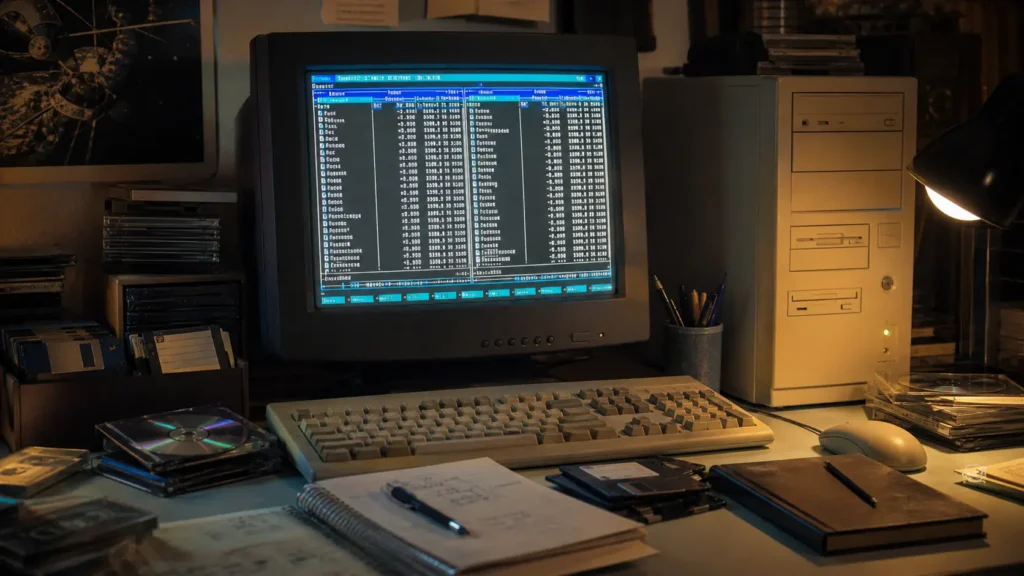
It had the visual language of serious use. Two panels. Tiny icons. Columns packed tightly. Function-key labels stretched across the bottom like a promise that the keyboard mattered. Nothing about it tried to reassure a beginner. It was not rude exactly, but it had no interest in pretending that every feature should reveal itself slowly.
For some people, that was a barrier.
For others, it was an invitation.
The official FAQ still describes Total Commander in the simplest possible terms: a file manager for Windows, like Explorer, but capable of much more. The feature list makes clear what "much more" means: archive handling as if archives were directories, built-in ZIP support, internal unpackers, FTP and SFTP access, file comparison, synchronization, multi-rename, tabbed browsing, plugin expansion, and more.
That list helps explain the cult following better than nostalgia alone does.
Total Commander was never just admired because it was old. It was admired because it made ordinary file work feel like a higher form of literacy.
The two-pane layout changed the emotional shape of file management
If you did not grow up around orthodox file managers, it can be hard to explain why two panes matter so much.
But once they click, they really click.
A single-window file manager often makes movement feel abstract. Open one folder. Then another. Then go back. Then compare mentally. Then drag carefully. Then hope the context still makes sense. Total Commander’s split view made file operations feel spatial. Source and destination could both be present. Comparison felt immediate. Moving, copying, and organizing stopped being a memory test.
That directness is hard to forget once you have felt it.
The official feature page reflects this same philosophy all the way through. Archives can behave like subdirectories. Different formats can be unpacked internally. Two directories can be synchronized. Duplicate work can be reduced through bulk tools rather than repeated by hand. The program assumes that once you care about files, you probably care about them in batches, patterns, and structures, not just one at a time.
That is a very particular worldview.
It is not the worldview of a casual desktop.
It is the worldview of someone who expects the file system to be worked on.
It belonged to the same culture as command prompts, batch files, and keyboard confidence
This is a big part of the cult following too.
Total Commander belongs to a family of software experiences that made the computer feel less like an appliance and more like territory. The same sensibility lives inside old command-line habits, manual file paths, keyboard shortcuts memorized with pride, and the quiet satisfaction of doing something faster than the GUI expected.
That is why it feels spiritually close to the world I wrote about in MS-DOS batch files making everyone feel like a hacker. It is not that the tools are identical. It is that they reward the same kind of temperament: someone who does not merely want to use the machine, but to develop a working relationship with it.
Total Commander never pretended the keyboard was optional decoration. It made it feel native. The function-key strip at the bottom turned the keyboard into a map. Commands were not hidden behind layers of polished discoverability. They were simply there, waiting for you to learn them.
And once you did, the program stopped looking dense and started looking efficient.
That transformation, from intimidation to fluency, is one of the deepest reasons software earns lifelong loyalty.
It made files feel less like icons and more like objects
This may sound small, but I think it is central.
Windows Explorer gradually taught many people to think in terms of documents, pictures, downloads, and vague places where things live. Total Commander belongs to an older and more literal feeling of computing. Files have names, sizes, timestamps, attributes, locations, and relationships. Archives are not mystical compressed bubbles. They are containers you can enter. Transfers are not invisible magic. They are operations with direction.
That difference changes the user’s posture.
You stop merely opening things.
You start handling them.
For a certain kind of techie, that feeling is addictive because it restores a sense of materiality to digital work. The file system becomes legible. The machine feels less like a glossy surface and more like an internal structure you can actually read.
I think that is also why older utility software inspires so much affection. It did not always try to soften reality. It often tried to reveal it.
Its density became part of its charm rather than a flaw
Modern software often chases emotional ease first. Bigger spacing. Fewer buttons. More assumptions. Less visible machinery.
I understand why. Most people do not want to manage files as a craft. They want the right document to appear when needed and the rest of the operating system to stay out of the way.
But that design trend leaves behind a certain kind of user, the one who prefers density over distance.
Total Commander still appeals to that person because it wastes very little space on atmosphere. It is not trying to look gentle. It is trying to remain useful.
Even the current official home page tells a story of continuity rather than reinvention. As of July 1, 2026, the site lists Total Commander 11.58 as the current Windows release, and the page still foregrounds classic capabilities rather than trend language. That matters. The software has not survived by pretending to be new in the way other software tries to be new. It has survived by continuing to serve a stable taste.
Cult software often works this way. Its users do not need it to become culturally dominant. They need it to remain itself.
The old name matters too
From 1993 until 2002, the program was called Windows Commander before being renamed Total Commander, something the official FAQ still notes clearly. That older name lingers in the memory of many users because it captures the era so perfectly.
"Windows Commander" sounds like software from a time when programs were allowed to sound powerful without irony.
It belongs to the same cultural shelf as Norton Commander, Turbo buttons, beige cases, and the larger tradition of software that did not mind sounding like equipment. Even after the rename, some of that identity remained. Total Commander still sounds less like an app and more like a tool you carry.
That matters in nostalgic memory because names help preserve the emotional setting of an era. The old software world was full of utilities that sounded purposeful, technical, and slightly overcommitted. That seriousness was part of the fun.
Plugins, archives, and bulk actions made it feel endlessly deeper than expected
Another reason people stayed loyal is that Total Commander kept rewarding curiosity.
You could arrive for ordinary copy and move operations and stay for everything else. The official feature list reads like the menu of a user who eventually got tired of being told that one file at a time should be enough. Pack and unpack archives. Search deeply. Compare content. Rename many files in one pass. Extend behavior with plugins. Connect to remote locations. Synchronize entire directories.
That kind of capability creates a special kind of relationship with software. The user begins by learning commands. Then the commands become habits. Then the habits become standards by which other software feels strangely incomplete.
That is how cult followings form.
Not because the software is universally superior in every context, but because once it becomes native to a person’s workflow, ordinary alternatives feel emotionally underpowered.
It also survived because techies love tools that signal seriousness to one another
There is an identity layer here that should be admitted openly.
Using Total Commander has long functioned as a small social signal inside technical culture. It suggests patience. Preference. A tolerance for density. A mild suspicion of default tools. Sometimes that signal is a little theatrical, but it is real.
The same thing happened with text editors, terminal emulators, IRC clients, download managers, audio players, and all the other utilities that attracted communities stronger than their market share would imply.
People who love tools like Total Commander are often saying two things at once:
- this tool genuinely helps me;
- I like what using it says about the way I approach computers.
That does not make the loyalty fake. It makes it human.
Nostalgia alone is not enough to explain why it is still here
If Total Commander had only been nostalgia, it would have become an abandoned relic years ago.
Instead, the official site still shows active releases, current downloads, and ongoing change logs. That means the story is not just about memory. It is about continuity. The program still has users who actively expect it to remain part of modern Windows life.
That is what makes the cult following interesting.
It is not a museum audience.
It is a working audience.
People still use Total Commander because the underlying taste it serves never disappeared: some users want file management to be fast, explicit, keyboard-friendly, dense, and deeply capable. The mainstream may not be organized around that taste anymore, but the taste itself is still alive.
Total Commander never tried to become the universal answer for everyone. It stayed intensely useful for the people who wanted exactly this kind of power, structure, and directness.
What it says about tech culture now
Total Commander’s survival reminds me that progress in software is not always a straight line from old to new, awkward to elegant, dense to simple.
Sometimes older design philosophies continue because they solved a different emotional problem better than modern software does. They gave users a sense of command. Not convenience only, but command.
That word matters.
For the people who still love tools like this, the computer is not just a device that should politely guess what they mean. It is a system whose internal logic can be learned, sped up, and bent toward intention. Total Commander still feels aligned with that worldview.
And maybe that is why it continues to inspire the sort of loyalty that newer, prettier software rarely earns. It does not flatter the user by feeling easy. It rewards the user by becoming powerful once learned.
Its file discipline also makes more sense against the constraints described in the 1.44 MB floppy-disk era, when directory structure and deliberate copying were practical skills rather than aesthetic preferences.
Conclusion
Total Commander still has a cult following among techies because it represents more than a file manager. It represents a style of computing built on directness, keyboard fluency, visible structure, and the satisfaction of feeling slightly more capable than the default interface expected.
For people who never wanted their computers simplified into pure atmosphere, that appeal never really went away.
The interface may look busy.
The learning curve may still feel real.
The devotion may seem a little intense from the outside.
But software does not keep this kind of audience for decades by accident.
It does it by making a specific kind of user feel unmistakably at home.
FAQ
Why do some techies still prefer Total Commander over Windows Explorer?
Because it offers a denser, more keyboard-friendly, dual-pane workflow with bulk operations, archive handling, plugins, and a more explicit sense of control over files.
Was Total Commander always called Total Commander?
No. According to the official FAQ, it was called Windows Commander from 1993 until 2002 before being renamed Total Commander.
Is Total Commander still actively maintained?
Yes. The official site listed Total Commander 11.58 as the current Windows release on July 1, 2026, which shows the project is still actively updated.
What makes the dual-pane layout so important?
It makes file operations more spatial and direct. Source and destination can stay visible at the same time, which makes copying, comparing, and organizing feel less abstract.
Is the cult following mostly nostalgia?
Nostalgia helps, but it is not the whole story. The program still serves a real preference for dense, capable, keyboard-oriented file management that many users continue to value today.