There was something wonderfully dramatic about the turbo button when you were young enough not to know what it did.
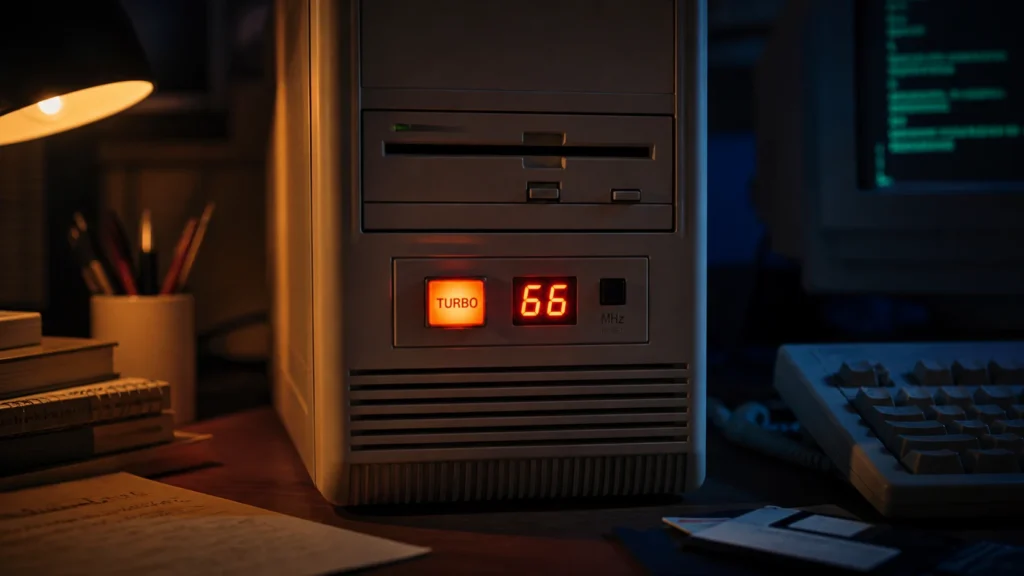
It sat on the front of the beige case like a promise. Not as ordinary as the power switch. Not as alarming as reset. More mysterious than both. Sometimes it lived next to a tiny two-digit LED display that seemed to be telling you, in serious glowing numerals, exactly how powerful your machine had become. If a PC had a turbo button, it felt advanced before you even understood the word advanced.
That is probably why the myth lasted so well. The name sounded cinematic. The hardware looked important. And from a child’s perspective, every part of the ritual made sense. Press button. Number changes. Machine becomes more intense. Of course that meant more speed.
The truth is more interesting than that. The turbo button mattered because old PCs were living through a strange historical moment. Newer machines were becoming much faster than the software culture around them had expected. And for a while, one of the most practical things a computer could do was pretend to be slower.
- Why the turbo button felt more powerful than it really was
- What the button usually did in technical terms
- Why slowing a PC down could be genuinely useful
- Why the front-panel speed display often lied a little
- Why some people remember turbo as faster and others remember it as slower
- What the button says about that era of PC history
The historical details below are checked against the official documentation at minuszerodegrees.net; the interpretation and first-person perspective remain the author’s own.
The button looked like a shortcut to raw power
The emotional story of the turbo button came before the technical one.
On many machines from the late DOS and early Windows era, the front of the case already carried an entire little theater of computing seriousness: power light, drive light, reset switch, key lock on some models, maybe a tiny speaker grill, maybe that glowing numeric display. The turbo button fit into that theater perfectly. It suggested that speed itself was something you could summon from the outside, like revving an engine with your finger.
That mattered because old PCs were not sealed appliances yet. They felt mechanical and open-ended. You could see their drives. You could hear them think. Their cases suggested that functions lived in physical places. If there was a button called Turbo, it felt natural to believe that it really activated an extra layer of power that had been waiting patiently inside the machine.
The myth was not childish in a stupid way. It was childish in a beautifully logical way.
That is part of what I still love about that era. The computer was not only used. It was interpreted.
The real function was usually simpler and stranger
In practical terms, the turbo button usually selected between a machine’s higher normal running speed and a reduced speed intended for compatibility.
Retro manuals make this very explicit. The SUPER-10 Turbo XT Mainboard manual describes a dual-clock design where normal mode runs at 4.77 MHz, while turbo mode raises the clock to 8 or 10 MHz. A separate Turbo-XT installation guide similarly notes that some software should be used in normal mode. By the time 286, 386, and 486 systems became common, the same basic idea had evolved into a familiar front-panel behavior: one state for full speed, another for a slower mode that could make older software behave more correctly.
That is the first thing worth clearing up: the button was not usually adding secret power beyond what the machine was already designed to offer. In the intended configuration, "turbo on" generally meant the computer was running at its proper higher speed. "Turbo off" often meant the machine was being deliberately slowed down.
This is why the famous modern summary, "the turbo button actually made the computer slower," is both broadly true and slightly incomplete.
It is true in the sense that many people used the button to drop a fast PC into a slower compatibility mode.
It is incomplete because the button was still named from the machine builder’s perspective. The faster state was the turbo state. The slower state was the fallback.
That distinction matters, because it explains why the myth became so sticky. The name was not exactly wrong. It was simply attached to a problem that later generations no longer expect computers to have.
Old software could be far more speed-sensitive than memory suggests
One of the hardest things to explain to someone raised on modern operating systems is just how casually older software could depend on CPU speed and timing assumptions.
Today, we instinctively expect applications and games to rely on proper timing sources, operating-system abstractions, and hardware layers that are at least somewhat decoupled from raw processor frequency. That expectation was weaker in the 1980s and early 1990s, especially in the world of DOS software and games. Some programs simply behaved better on a machine that resembled the environment they had been written for. Others ran too fast, timed things badly, or felt wrong in subtler ways.
That is the historical pressure that made the turbo button sensible.
The point was not vanity. It was compatibility.
And compatibility was a much more emotional concern back then than it sounds now. A home PC was not just a productivity box. It was a place where software had personality. Games behaved differently. Utilities had quirks. Educational programs were strange. Installers assumed things. A machine that was "too modern" could feel unexpectedly awkward with the very software that made owning the computer exciting.
So yes, sometimes the great turbo button was there to help a newer computer behave more like an older one.
That feels almost poetic now.
The display next to the button often performed confidence more than measurement
The other part of the myth lived in those wonderful glowing numbers on the case.
If the display changed from something like 16 to 33, or 33 to 66, it was almost impossible not to believe you were watching the machine report its true speed in real time. The display made the story feel official.
But many of those front-panel displays were much more theatrical than scientific.
Motherboard and case documentation from the period shows that the display was often configured with jumpers or wiring presets. In other words, the case could be told what to show in the "fast" state and what to show in the "slow" state. It was not necessarily measuring the processor in the way a modern monitoring tool would. It was presenting one of two predefined answers.
That does not make it fake in a cynical sense. It makes it wonderfully of its time.
The PC case was part machine, part dashboard, part stage prop.
Sometimes the numbers were close to reality. Sometimes they were simplified. Sometimes they were chosen because they looked right. And sometimes, as period coverage in PC Magazine noted for at least one system, the front-panel turbo switch itself was effectively cosmetic while speed changing happened another way entirely.
That little lie is one of the reasons the memory of the turbo button survived so vividly. It was not merely a function. It was a narrative device. It helped the user feel the machine changing.
Why some people swear it made the PC faster and others swear it made it slower
This is where the myth becomes a real memory puzzle.
If you talk to enough people about turbo buttons, you will hear two absolutely sincere recollections:
- "Pressing turbo made the computer faster."
- "No, pressing turbo actually slowed it down."
Both memories can exist honestly because the historical reality was messy.
First, the intended logic was usually that turbo mode meant the faster state. But some systems were wired in ways that inverted the physical button position. Pressed in could mean fast on one machine and slow on another. What mattered electrically was the mode, not the drama of the plastic button’s travel.
Second, many of us encountered these machines as children, visitors, siblings, or second owners. We did not always know whether the case wiring was original, whether the display was accurate, or whether the machine’s builder had configured things in a conventional way.
Third, memory simplifies. It keeps the feeling and discards the wiring diagram.
So the most honest version of the story is this:
- the turbo feature generally existed to provide a higher-speed mode and a slower compatibility mode;
- many users experienced the button as a way to slow a too-fast machine down;
- the physical position of the button and the displayed numbers were not always trustworthy guides to what was really happening.
That ambiguity is not a flaw in the story. It is the story.
The turbo button belongs to a brief age when PCs had to live in two time periods at once
This is what fascinates me most about it now.
The turbo button was not just a quirky hardware feature. It was a visible sign that the PC world was moving faster than its software habits. The machines were advancing, but the ecosystem still needed a bridge back to earlier expectations. That bridge ended up right on the front of the case, where anyone could touch it.
I think that is why the button still feels emotionally bigger than it was technically.
It stood for a contradiction:
- we wanted newer machines;
- we still wanted older software to behave;
- we trusted physical controls more than invisible compatibility layers;
- we were living in an era when speed itself could still be too much of a good thing.
That contradiction feels deeply specific to old personal computing.
It belongs to the same emotional world as floppy-disk installs, CRT warmth, and the strange seriousness of a beige box on a desk. It belongs to the world described in those childhood 1.44 MB rituals, the world where hardware did not just exist in the background. It announced itself.
It also taught a subtle lesson about progress
There is something quietly beautiful in the fact that one generation of PCs needed a button to become less modern on purpose.
We usually tell the history of computing as a clean climb upward: more speed, more memory, more storage, more polish. And of course that climb is real. But the turbo button reminds us that progress is rarely experienced as a straight line. Sometimes a better machine creates new friction precisely because it no longer resembles the environment older software expected.
That is why the turbo button feels different from a simple performance switch.
It was not only about giving the user more.
It was about preserving continuity while the platform was changing underneath everything.
In a strange way, that makes it feel more human than many later abstractions. It acknowledged, right there on the case, that faster was not always identical to better in every moment. Sometimes what you wanted from the future was a controlled way to visit the past.
Why the myth survived better than the mechanism
Most people do not remember the exact electrical implementation of the turbo switch. They remember the feeling of it.
They remember the word.
They remember the glow.
They remember the seriousness of pressing it.
They remember that it seemed to matter.
And honestly, that is enough to explain its cultural survival.
The mechanism was transitional. The myth was permanent.
In that sense, the turbo button belongs to the same category as a lot of retro PC memories. It is partly a hardware fact and partly a mood. Like the last years of CRT loyalty or the way MS Paint once felt like a complete creative universe, the thing we remember most clearly is often not the specification. It is the role the object played in how the machine felt.
The turbo button made a PC feel alive, configurable, and slightly dangerous in the best possible way.
That broader period is easier to understand alongside Why Desktop PC Cases in the 90s Were Always Beige, which captures another part of the same transition in personal computing.
Conclusion
The turbo button myth survives because it deserved to. Not because the myth was strictly correct, but because the real story is even better.
That small front-panel switch was usually not a magical speed booster. More often, it was part of a compatibility strategy for an era when newer PCs had become too fast for some older software assumptions. In many systems, turbo meant full speed, while switching it off dropped the machine into a slower mode. And thanks to wiring quirks, decorative displays, and childhood interpretation, the memory of what the button did became blurrier than the engineering underneath it.
What remains is the feeling: that there was once a time when speed lived on the front of the case, glowing in two digits, waiting for your finger.
That may not be the most technically important chapter in PC history.
But it is one of the most memorable.
FAQ
Did the turbo button really make old PCs faster?
Usually, turbo mode meant the machine was running at its intended higher speed, while the other mode reduced speed for compatibility. So in that sense, yes, turbo was the faster mode. But many people remember using the button mainly to slow machines down.
Why would anyone want to slow a computer down?
Because some older DOS-era software and games could behave badly on newer, faster hardware. A slower mode helped certain programs feel more like they did on older systems.
Was the number on the case display the real CPU speed?
Not always. On many systems the display showed preset values configured by jumpers or wiring, rather than measuring the processor dynamically like a modern hardware monitor.
Why do some people remember the button working backwards?
Because some systems were wired in ways that inverted the physical button position, and because many users encountered these machines secondhand without knowing exactly how the case had been configured.
When did the turbo button disappear?
It faded as software and operating systems became less dependent on raw CPU speed assumptions, and as later PCs no longer needed such an obvious front-panel compatibility trick.